Stacks Image 521

Discover PROKON 5.3, a comprehensive structural engineering solution for the analysis, design and detailing of concrete and steel structures. EASYCAD provides software licensing, professional training and technical support to engineers and structural design firms in Malta, Croatia and Italy.

Structural Engineering • Analysis • Design

Structural Engineering Analysis and Design Software

Designed by Structural Engineers for the global engineering community.

At EASYCAD LP, we are committed to providing innovative solutions for structural engineering professionals. As an authorized reseller of PROKON Structural Engineering Software, we offer a comprehensive suite of tools designed to streamline your structural analysis, design and detailing processes.

Why Choose PROKON?

User-Friendly Interface

PROKON’s intuitive design ensures a minimal learning curve, allowing you to focus on your engineering projects.


Seamless Integration

Easily integrate PROKON with third-party software to improve collaboration and enhance your engineering workflow.

Extensive Design Codes

Access a comprehensive library of international and legacy design codes for a wide range of project requirements.

Multilingual Support

Work in a flexible multilingual environment developed to support engineering professionals around the world.

Low Hardware Requirements

Experience reliable and efficient performance without the need for expensive, high-end computer hardware.

Proven Expertise

With more than 30 years of industry experience, PROKON is trusted by structural engineers in over 140 countries.

Local Professional Support

Benefit from proactive assistance, licensing guidance and professional support from the experienced EASYCAD team.

Our Services

01

Software Licensing

Purchase the latest PROKON version and select the applications, modules and licensing model that best fit your requirements.

02

Professional Training

Participate in comprehensive training sessions designed to help your team make full and productive use of PROKON.

03

Technical Support

Receive ongoing assistance with installation, activation, configuration and the prompt resolution of technical issues.

Get Started with PROKON Today

Talk to the EASYCAD team and discover the right PROKON solution for your structural engineering projects.

Request Information →

Authorized PROKON Reseller for Malta, Croatia & Italy
Friendly Environment


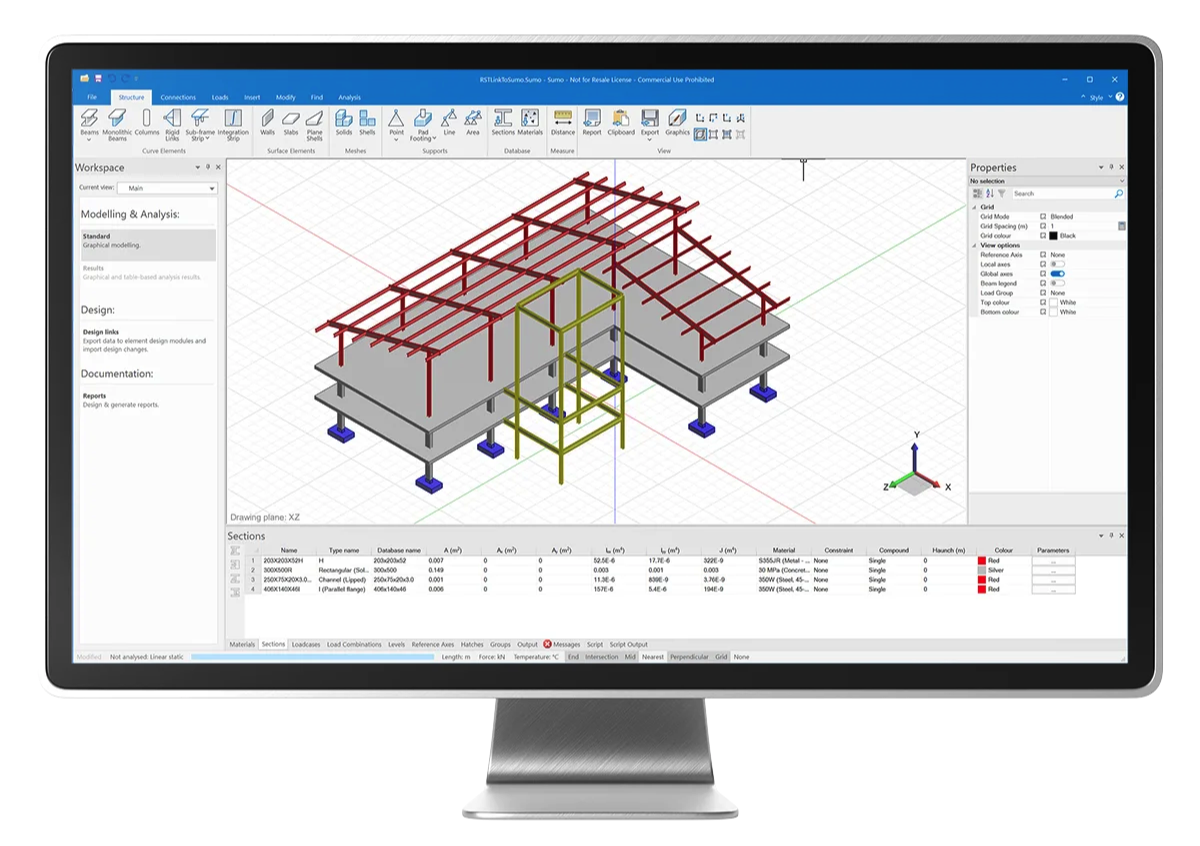
Analyze, design, and create detailed plans using PROKON, a comprehensive and user-friendly structural engineering software trusted by engineers in over 140 countries. Our latest version fosters innovation and teamwork while minimizing time and errors.

Integrating PROKON into your existing system is straightforward, thanks to bi-directional compatibility between Autodesk Revit and PROKON SUMO. This feature allows internal and external project partners from various disciplines to collaborate efficiently and seamlessly.

State-of-the-art solution


Why opt for PROKON Structural Analysis and Design software?
PROKON is a state-of-the-art solution developed by a team of adept software and structural engineers, leveraging their deep industry knowledge and technical proficiency. Our software is crafted to deliver consistently high-quality results and cater to user requirements. Drawing on our team's extensive expertise and experience, we continually enhance PROKON to ensure it stays at the forefront of the industry.

Minimal learning curves


- Intuitive and user-friendly interfaces with minimal learning curves
- Effortless integration with third-party software
- Extensive library of design codes, including legacy codes
- Support for multiple languages
- Very low hardware requirements
- Over 30 years of expertise in structural engineering software development
- Localized support from proactive, professional, and reliable partners
- A wide array of courses available through the PROKON Academy
- Designed and supported by experienced structural engineers.

Complex concepts become more effective


Trusted by over 20,000 professionals across 140 countries, Prokon Structural Engineering Solutions is widely acclaimed for its effectiveness and reliability.

Professionals use Prokon as their primary tool for analysis and design, appreciating its simplicity and comprehensive detail. By validating their work with physical calculations, they ensure accuracy and precision in their projects.

Moreover, Prokon's intuitive 3D models help professionals understand complex concepts more effectively, making it an indispensable tool in the field of structural engineering.

Benefits of the software


- The most intuitive engineering software available in the market
- Minimizes ambiguity
- Simplifies comprehension
- Decreases manual work required on projects
- Utilizes a familiar input format for engineers
- Provides example files to showcase functionalities
- Boosts efficiency and accuracy
- Lowers the risk of human errors
- Empowers design engineers with greater control
- Adheres to the engineering workflow in its layout
- Graphical modeling eliminates the need for tabular data input
- Significantly reduces discretization time with automated surface meshing
- Streamlines the interpretation of loading codes with the load combination generator
- Offers a Python scripting interface for task automation
- Enables work from any location
- Compatible with design codes from a wide range of countries
- Supports multiple languages for report submissions in preferred languages

More features


- Robust graphical modelling capabilities
- Support for importing DWG and IFC files
- Automated surface mesh generation
- Load combination generation for efficient analysis
- Comprehensive support for shell and solid finite elements
- Static analysis including linear, second-order, non-linear, and buckling analyses
- Dynamic analysis options such as modal, seismic, and harmonic analyses
- Seamless design integration with PROKON design solutions through design links
- Python scripting interface for advanced customization
- Detailed and informative rich text reporting functionality

Concrete features a range of capabilities


- Pile Cap
- Rectangular Column
- Pad Footing
- Continuous Beam
- Circular Column
- Crack Width
- Captain
- General Column
- Beam Section
- Rectangular Slab
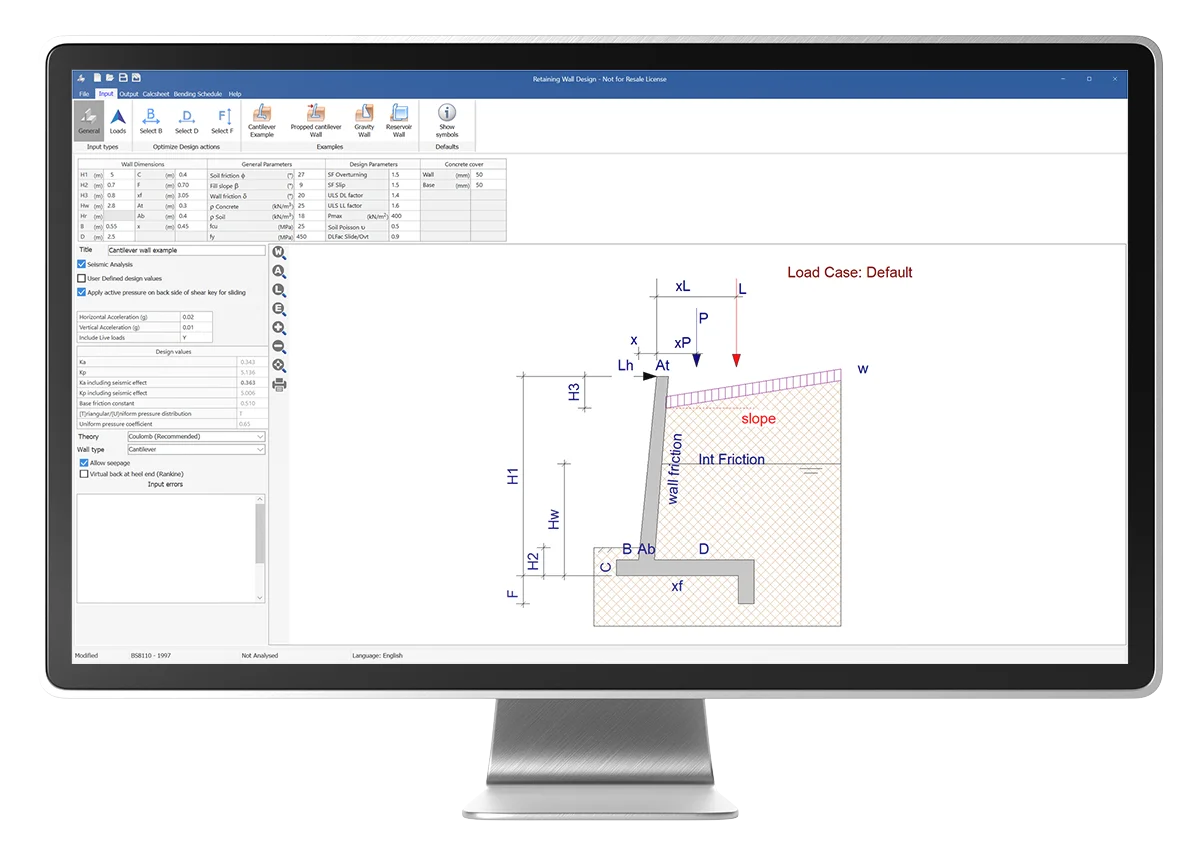
- Retaining Wall
- Punching Shear

Steel capabilities encompass a variety of advanced structural elements


- Column Splice functionality for precise column connections
- Base Plate feature for robust foundation support
- Bolt Group tool for efficient management of bolted connections
- End Plate design for secure end connections
- Strut component for added structural support
- Beam Column capability for integrated beam and column analysis
- Weld Group functionality for welding specifications
- Anchor Bolt design for anchoring structural elements
- Crane Beam tool for optimized crane support design
- Apex feature for defining precise top structures
- Cleat function for improved joint connections
- Combine utility for merging and optimizing structural components

Composite capabilities


Prokon Composite capabilities offer a comprehensive set of features for composite structural analysis:
- Beam functionality tailored for composite beam design and analysis
- Continuous Beam tool for analyzing continuous composite beams
- Filled Column feature for detailed assessment of composite columns filled with materials
- Encased Column capability for precise modeling and analysis of encased composite columns

Masonry capabilities


Prokon Masonry capabilities encompass a range of specialized tools for masonry structural analysis:
- Sections feature for defining and analyzing masonry sections with precision
- Walls functionality for detailed assessment and design of masonry walls
- Free-standing walls tool for modeling and analyzing standalone masonry walls with accuracy

Probar 2D for Autodesk® AutoCAD®


Probar 2D is an add-in for Autodesk® AutoCAD® that turns it into a fully featured reinforced concrete detailing system. Probar 2D offers similar functionality to PROKON Padds, only in the AutoCAD® environment.

Probar 2D allows you to detail reinforcement directly in AutoCAD®. Drawings that were created in Padds can also be opened in Probar 2D to work with bending schedules generated by the PROKON concrete design modules.

Reinforcement shape codes specified in the SA and UK detailing codes are included by default, and an easy-to-use rebar editor can be used to create custom shapes. Use multiple rebar types – single bars, bar groups, ABR (alternate reversed bars), staggered bars, stepped bars, and fanned bars – to add reinforcement to drawings.

PROKON 5.3 Probar 2D for AutoCAD® capabilities include:
• Detail rebar in AutoCAD®
• Automatic scheduling
• Input wizards

Probar 2D for BricsCAD® or ZWCAD®


Probar 2D for BricsCAD® or ZWCAD® is a software application designed to facilitate the detailing and scheduling of reinforcing steel (rebar) in 2D within the BricsCAD® environment. It is part of PROKON’s diverse range of software solutions.


Key features and functionalities of Probar 2D for BricsCAD® or ZWCAD®:
  • Rebar Detailing: Probar 2D allows for the efficient creation of detailed rebar drawings within BricsCAD® or ZWCAD®, supporting various rebar shapes and configurations.
  • Scheduling: The software can generate bar bending schedules (BBS) automatically from the detailed drawings, ensuring accurate and consistent rebar schedules that comply with industry standards.
  • Integration: Seamlessly integrates with BricsCAD® or ZWCAD®, providing a familiar user interface for those accustomed to CAD environments, and ensuring smooth workflow integration with other Prokon tools.
  • Customization: Users can customize rebar detailing to meet specific project requirements, including the definition of rebar shapes, dimensions, and other properties.
  • Automation: Automates repetitive tasks in rebar detailing, which increases productivity and reduces the likelihood of errors.
  • Compliance: Ensures compliance with local and international rebar detailing standards, making it suitable for use in various regions around the world.
  • Sharing and import of rebar shapes
  • Convert old text shape code lists to XML format

Overall, Probar 2D for BricsCAD® or ZWCAD® streamlines the process of creating rebar drawings and schedules, making it a valuable tool for structural engineers and detailers working on reinforced concrete projects.

This powerful software is designed to revolutionize rebar detailing and scheduling within the BricsCAD® or ZWCAD® environment, bringing unparalleled efficiency and precision to your projects.
Stacks Image 500
Stacks Image 497
Stacks Image 273

PROKON 5.3 Complete capabilities include


Structural analysis
Finite element analysis
Seismic analysis
Concrete slabs
Punching shear
Concrete columns and beams
Prestressed beams
Composite columns and beams
Timber beams
Masonry beams
Plate girders
Foundations
Steel connections
Concrete anchors
Masonry walls
Rebar detailing

Stacks Image 270

PROKON 5.3 Essentials capabilities include


Structural analysis
Concrete design
Steel design
Rebar detailing

Geotechnical capabilities


• Bishop slope
• Non-circular slip
• Wedge analysis
• Rock slope
• Bearing capacity
• Jointed Rock Masses
• Rock Rough Joints
• Pile Bearing
PROKON Help Centre

Frequently Asked Questions about PROKON

Find answers about PROKON’s capabilities, licensing options, trial version, professional training and technical support.

01 What is PROKON 5.3?

PROKON 5.3 is a comprehensive software suite for structural analysis, design and detailing. It includes specialised applications for reinforced concrete and steel structures, as well as tools for producing structural drawings and reinforcement details.

02 Who is PROKON designed for?

PROKON is designed for civil and structural engineers, engineering consultancies, design offices, construction companies and other professionals involved in the analysis and design of concrete or steel structures.

03 Which applications and capabilities are included?

Depending on the selected package and modules, PROKON can cover structural analysis, reinforced concrete design, steel design, foundation design and reinforcement detailing through Probar 2D.

EASYCAD can help you select the applications that best match the actual requirements of your engineering practice.

04 Is PROKON available with a perpetual or annual licence?

Yes. PROKON is available with both perpetual and annual licensing options. This allows each professional or engineering firm to select the licensing model that best suits its requirements and budget.

05 Can I try PROKON before purchasing it?

Yes. Contact EASYCAD for a presentation of the available applications, an assessment of your requirements and information about the available PROKON trial version.

Email us at sales@easycad.com.gr or call +30 210 726 4015.

06 Is professional training available for PROKON?

Yes. EASYCAD provides professional training and guidance to help you integrate PROKON smoothly into your engineering workflow. The training programme can be adapted to the applications and modules used by your team.

07 Do you provide technical support?

Yes. EASYCAD provides professional technical support for PROKON users in Malta, Croatia and Italy, covering installation, activation, essential configuration and everyday use of the software.

For technical assistance, contact support@easycad.com.gr .

08 How can I request a quotation for PROKON?

Contact EASYCAD and specify the applications you are interested in, the number of users and whether you prefer a perpetual or annual licence.

We will prepare a tailored proposal with the most suitable modules for your structural engineering requirements.

Email: sales@easycad.com.gr
Telephone: +30 210 726 4015

09 Where are EASYCAD’s offices located?

Offices
166A Kifisias Avenue & Sofokleous Street
151 26 Marousi, Athens, Greece

Meeting Point
Spaces Green Plaza
59–61 Agiou Konstantinou Street
Marousi, Athens, Greece

Still have questions about PROKON?

Contact EASYCAD for licensing guidance, a product presentation or a tailored quotation for your engineering practice.

Contact EASYCAD →

Authorized PROKON Reseller for Malta, Croatia & Italy
Official PROKON reseller by EASYCAD

EasyCAD LP - Professional CAD Software

Contact

Call Center:

📞 (+30) 2107264015

📞 (+30) 6933445504

📞 (+30) 6930934567

Sales Email:

📧 sales@easycad.com.gr

Support Email:

📧 support@easycad.com.gr

Addresses

📍 Offices: 166A Kifisias Avenue & Sofokleous Street, Marousi 15126

📍 Meeting Point 2: Spaces Green Plaza, 59-61 Ag. Konstantinou Street, Marousi, Athens

Privacy settings
Privacy settings

